



How to Program a Digital Thermostat Step by Step
What is a digital thermostat and how does it work?
A digital thermostat is a device that allows us to control the temperature precisely and automatically, adapting to our daily needs and improving the energy efficiency of the heating or cooling system. Unlike analog thermostats, digital models operate through sensors capable of accurately detecting the ambient temperature and activating or deactivating the system according to what has been previously programmed.
The thermostat acts as an intelligent switch. If the temperature drops below the set level, it activates the heating; and if it exceeds the desired value, it disconnects it. This simple logic, combined with scheduling options and personalized modes, makes digital thermostats an essential tool for home comfort and energy savings.
Advantages of using a programmable digital thermostat
Digital thermostats have evolved greatly in recent years and offer multiple advantages compared to more basic or analog models. Installing and programming a digital thermostat not only improves thermal comfort but also represents a considerable saving on the energy bill when used correctly.
Energy savings
By setting specific time slots and temperatures for each moment of the day, we avoid the system running unnecessarily. According to various studies, reducing the average temperature by just one degree can lead to up to 8% energy savings.
Accuracy and temperature control
Thanks to electronic components, digital thermostats display the temperature more accurately than mechanical models. This results in better thermal stability inside the room, without fluctuations or unnecessary system restarts. Some advanced models even allow you to set the exact temperature to tenths of a degree.
Personalized scheduling according to your routine
Digital thermostats allow you to set different scenarios—for example, turning on the heating half an hour before you get home or lowering the temperature at night while you sleep. This ability to adapt to your real schedule is key to achieving both efficiency and comfort.
Integration with smart home technology
Many modern models are compatible with voice assistants such as Alexa or Google Home and can be controlled remotely through an app. This adds extra comfort and flexibility since you can adjust the temperature from your phone wherever you are. Ideal for second homes or for anticipating unexpected weather changes.
Types of digital thermostats and how to program them
There are different types of digital thermostats on the market today, each with specific features and programming modes. Understanding how they work will help you get the most out of them and choose the model best suited to your heating or cooling system. Below we explain the three main types and how to program them.
Basic digital thermostat
This type of thermostat is the simplest within the digital range. It usually includes a small LCD screen and physical buttons to adjust the temperature and set basic schedules. Although it lacks advanced connectivity, it’s ideal for those looking for an affordable and functional option.
How to program it:
It typically includes a SET button that, when held, gives access to the configuration menu. From there, you can set temperatures for time slots (morning, afternoon, night) and select specific days of the week. It’s similar to using a digital alarm clock: intuitive and straightforward. They also include a factory reset option accessible from the settings menu to restore the default configuration if you need to start over.
Wireless thermostat
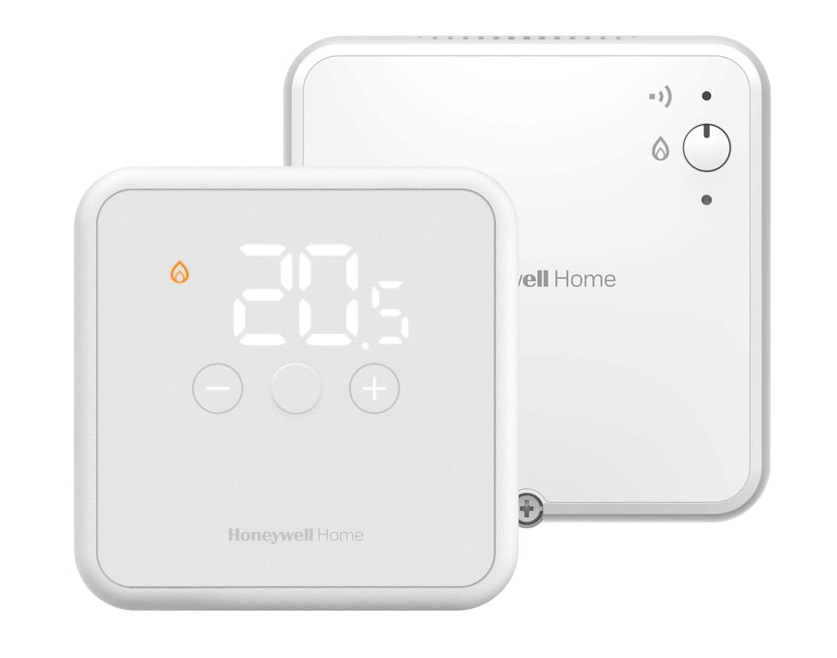
Wireless thermostats are an evolution of the basic model. They work via radio frequency and allow installation anywhere in the home without wiring since they communicate with a receiver connected to the boiler. Some models even include a base that allows you to move it around the house.
How to program it:
Although its operation is similar to a standard digital thermostat, these usually feature larger screens and more visual menus. Since they aren’t wired, installation is simpler. Many models allow detailed weekly programming, adjusting temperature and schedules with greater precision.
Smart thermostat programmable from your mobile
Smart thermostats have built-in WiFi connectivity and are the most advanced option. In addition to allowing full programming from the device itself, they can be controlled remotely from anywhere through a mobile app. Some models even support voice control, geolocation, or integration with other smart home devices.
How to program it:
Programming is done through an intuitive app. You can define hourly and daily temperatures, vacation modes, and receive energy consumption reports. Some models, like those from Honeywell or Siemens, even allow automatic routines based on your habits and movements.
Wired or wireless thermostats
Another important classification is the type of connection. Wired models require a fixed installation connected directly to the underfloor heating system. They are very stable and don’t depend on batteries. Wireless thermostats, on the other hand, communicate via radio frequency with the system receiver, allowing flexible placement without any construction work.
Ideal home temperature for efficient thermostat use
One of the most common mistakes when programming a digital thermostat is setting temperatures that are too high or too low. This affects both energy consumption and comfort. Correctly programming the temperature according to each time of day and activity is key to achieving the perfect balance.
Recommendations by time slot
- During the day (when at home): between 20 and 21 °C.
- At night (while sleeping): between 17 and 19 °C.
- Short absences: lower it to 16 °C to avoid wasting energy.
- Long absences or vacations: between 12 and 15 °C to prevent freezing or humidity, especially in winter (most digital thermostats include a 5 °C frost protection function).
Tips to stay comfortable without overspending
- Avoid setting the temperature above 21 °C. Each extra degree increases consumption by 7–8%.
- Schedule the system to start slightly before you arrive home.
- Use ECO or SAVING modes when you’re away.
- Take advantage of smart thermostat functions to automatically adapt the temperature to your habits.
- Use a zoning system to independently control different areas of the home according to use.
Step-by-step guide to programming a digital thermostat
Programming a digital thermostat isn’t complicated once you know where to start. Although each model has its own interface, most follow a similar logic. This step-by-step guide will help you set up your thermostat correctly—basic, wireless, or smart—so you can enjoy a comfortable temperature without wasting energy.
Step 1 – Install and configure the device
First, ensure that the thermostat is properly installed. If it’s a wall model, follow the manufacturer’s instructions to connect it to the heating or cooling system. If it’s wireless, verify that the receiver is correctly paired with the boiler. For smart models, download the app and connect the device to your WiFi network.
Step 2 – Set the date and time
This step is essential for schedules to work properly. Go to the basic setup menu and set the current day, time, and format. Some models allow automatic synchronization, especially app-controlled ones.
Step 3 – Set daily or weekly schedules
Once the time is configured, enter the scheduling mode. You can choose daily (24h) or weekly settings (different for each day). Usually, at least three periods are set: morning, afternoon, and night. Configure each slot with its start and end time.
Step 4 – Define desired temperatures for each time slot
For each scheduled period, set the ideal temperature. For example, 20 °C in the morning, 16 °C while away, 21 °C in the evening, and 18 °C at night. This keeps comfort without leaving the system running all day.
Step 5 – Select modes according to the season
Digital thermostats allow switching between heating, cooling, or auto modes. Choose the appropriate one for the season. In winter, set the heating with a minimum temperature; in summer, set higher cooling temperatures to reduce consumption.
Step 6 – Use extra functions like vacation or lock mode
- Many models include useful additional features:
- Vacation mode: keeps a minimum temperature while you’re away for several days.
- Key lock: prevents accidental changes to the settings.
- Advanced options: change language, 12h/24h format, screen brightness, etc.
These functions allow more complete and secure control of the system.
What to do if you can’t program your digital thermostat
Although programming a digital thermostat is generally simple, sometimes errors or locks can occur. If you encounter an issue, don’t worry—here are the most common solutions.
Common problem solutions
- The thermostat doesn’t respond to buttons: check the batteries (if wireless) or ensure it’s powered (if wired). Some models can be reset by holding down a combination of buttons.
- The schedule isn’t saved: it may be due to an internal battery failure or incorrect confirmation. Repeat the process and confirm each step.
- No connection to the boiler: verify that the receiver is properly paired with the transmitter if it’s a wireless model. Sometimes, simply re-pairing solves the issue.
- Incorrect temperature reading: make sure it isn’t placed near heat or cold sources (radiators, open windows, direct sunlight, etc.).
When to contact support or replace your device
If, after checking all the above, the thermostat still doesn’t respond or shows recurring issues, it may be faulty or outdated. In that case, it’s recommended to:
- Contact the manufacturer’s technical support.
- Consult a professional if the installation is complex.
- Consider replacing it with a newer model offering easier programming or WiFi connectivity, especially for intensive use.
At Todo-Control, we work only with official and reliable brands such as Honeywell and Siemens, ensuring long-lasting performance and access to specialized technical support.
Common mistakes when programming digital thermostats and how to avoid them
Even with a good thermostat, if not properly programmed, you may lose efficiency or waste energy. Here are some frequent mistakes you should avoid:
- Not adapting the temperature throughout the day: keeping it constant 24/7 is inefficient. Use scheduling to lower it at night or when away.
- Setting extreme temperatures: turning the heating to 26 °C won’t warm the room faster. You’ll just consume more energy.
- Not updating settings with seasonal changes: review your configuration in spring and autumn. What works in January may not in May.
- Ignoring the user manual: each thermostat has its particularities. Reading the manual can save you many issues.
- Disabling automatic mode: smart thermostats’ automatic settings are often very efficient. Try them—they’re designed to optimize comfort and consumption.
If you’re thinking of installing a digital thermostat or need help programming it correctly, at www.Todo-Control.com we offer expert, no-obligation advice. Our team will help you choose the ideal model for your system and configure it to maximize efficiency and comfort while minimizing energy costs.